HELLBOUND: Building a period film around live performance
"We wanted to preserve these accomplished actors’ performances exactly as they had delivered them, without altering them."
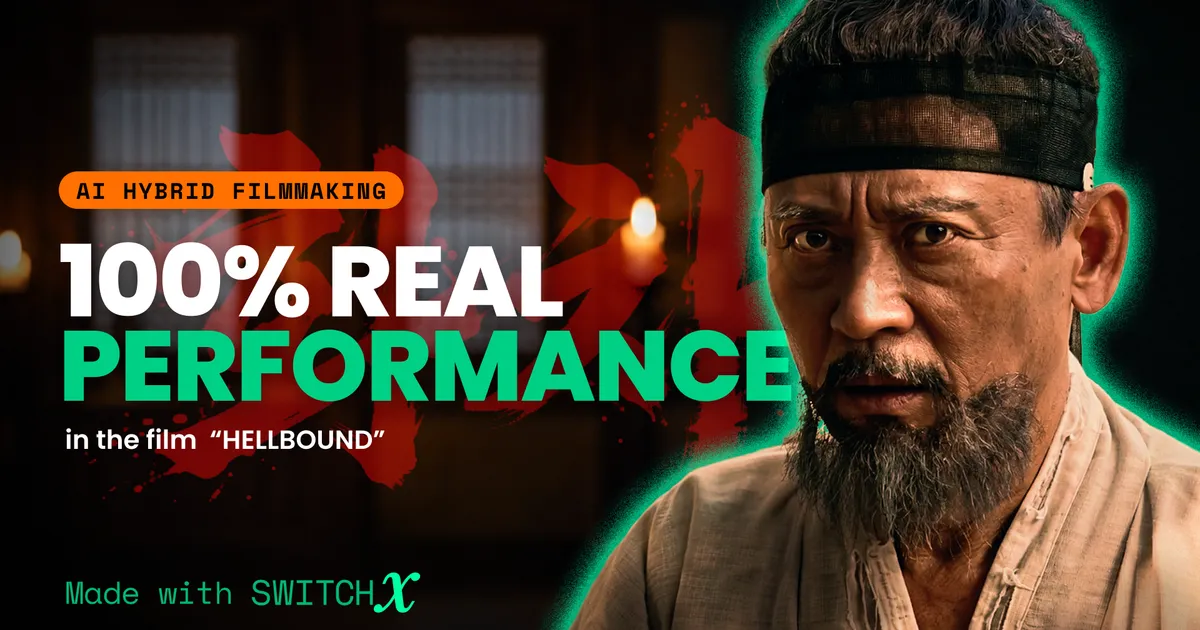
For HELLBOUND, director Dongha Oh and Mozaic Studio needed to recreate Korea’s Joseon dynasty without losing the performances they captured on set.
Inspired by Ryūnosuke Akutagawa’s story Hell Screen, the 22-minute short was filmed largely with live actors in a studio, with backgrounds and lighting transformed in post. More than 90% of the film used Beeble’s SwitchX.
Preserving the original performances was a priority. The cast includes veteran Korean actors Byeong-ok Kim (Oldboy), Eung-soo Kim (Tazza) and Sang-hee Lee (Hope). Earlier tests with generative video tools could alter expressions, timing, and even the intentional movement of the handheld camera.
The team also ran into problems recreating historically accurate environments. Image-generation tools often produced architecture that looked Chinese rather than Korean, so the filmmakers visited an open set to photograph Joseon-era locations themselves. They then used those photographs to create references that matched the composition and camera position of footage already shot in the studio.
We spoke with director Dongha Oh and AI Supervisor Sun Choi about producing HELLBOUND, how they decided what to preserve from the original photography, and where SwitchX fit into the workflow.
Shot in a studio, rebuilt as Joseon in post
Could you introduce yourself, Mozaic Studio, and HELLBOUND? What is the story, and what kind of visual world and atmosphere did you want to create?
Dongha Oh, Director: I am the director at Mozaic Studio. In 2024, my AI-hybrid film ZERO won grand prizes at various film festivals in Korea, the United States, Japan, and elsewhere. HELLBOUND is my next film. The project is based on Hell Screen by Ryūnosuke Akutagawa, the Japanese author best known for Rashomon.
We took the setting of the original short story, first published in 1918 and set during Japan’s Heian period, and reimagined it in Korea’s Joseon dynasty. Then we added our own interpretation and transformed it into a 22-minute short film. I wanted to capture on-screen the same sense of intensity and awe I felt when I first read the original story.
How did you approach the production? What did you decide to capture practically, and what did you plan to create or transform in post-production?
Dongha: We used Beeble’s SwitchX on more than 90% of the film, except for sequences that were difficult to achieve practically, such as long full shots requiring many background performers or scenes involving firewood being set alight. We shot almost everything with live-action photography and then used SwitchX to transform the backgrounds and lighting.
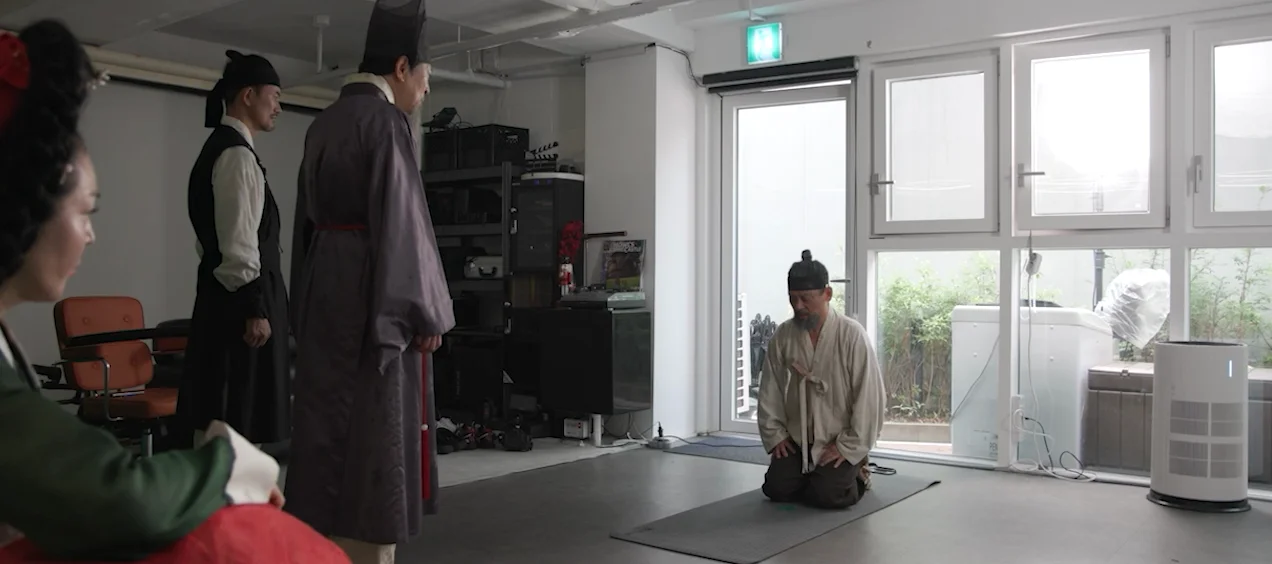 Studio footage
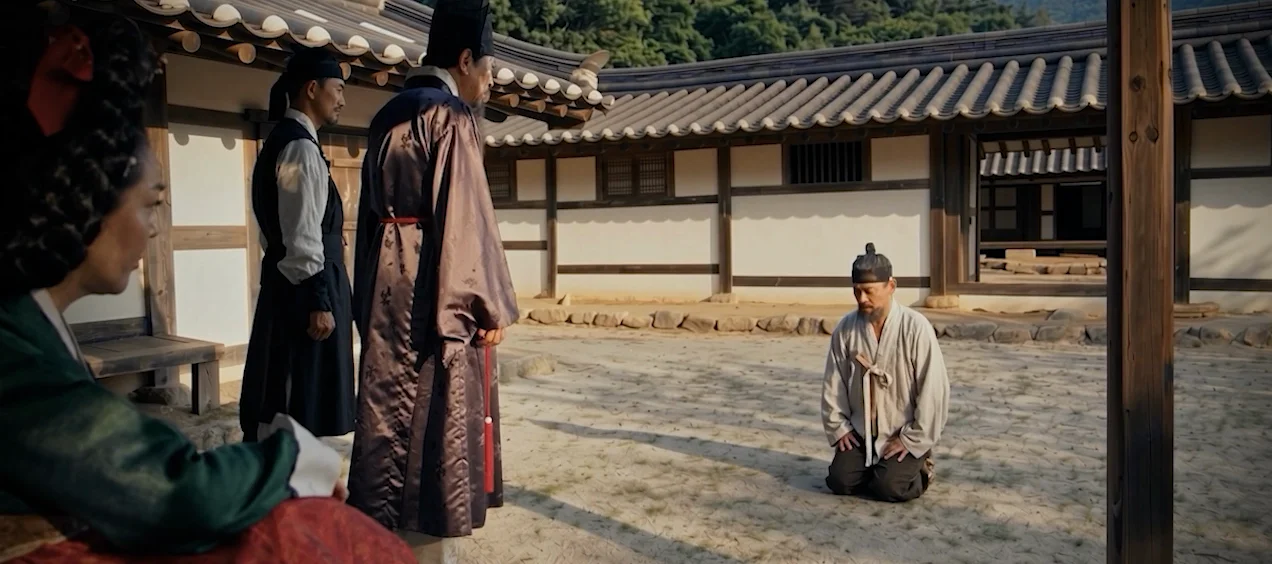 Final with SwitchX
What were the biggest creative or technical challenges in achieving the final look you wanted?
Dongha: Our goal was for the finished film to look completely as though the actors had actually been filmed on location. We spent a great deal of time on color grading to overcome the subtle visual disconnect that can occur between the actors and their environments.
Another challenge was historical accuracy. Unfortunately, most of the image-generation AI tools currently available struggle to reproduce Joseon-era architecture accurately. As we’ll explain later, we put a significant amount of effort into finding ways around this limitation.
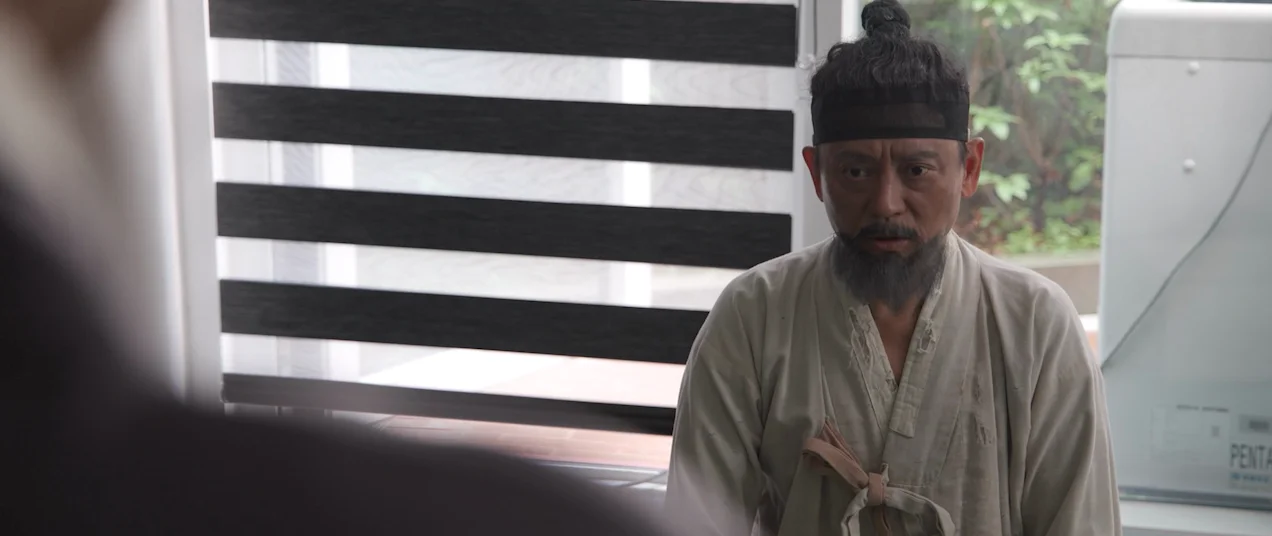 Studio footage
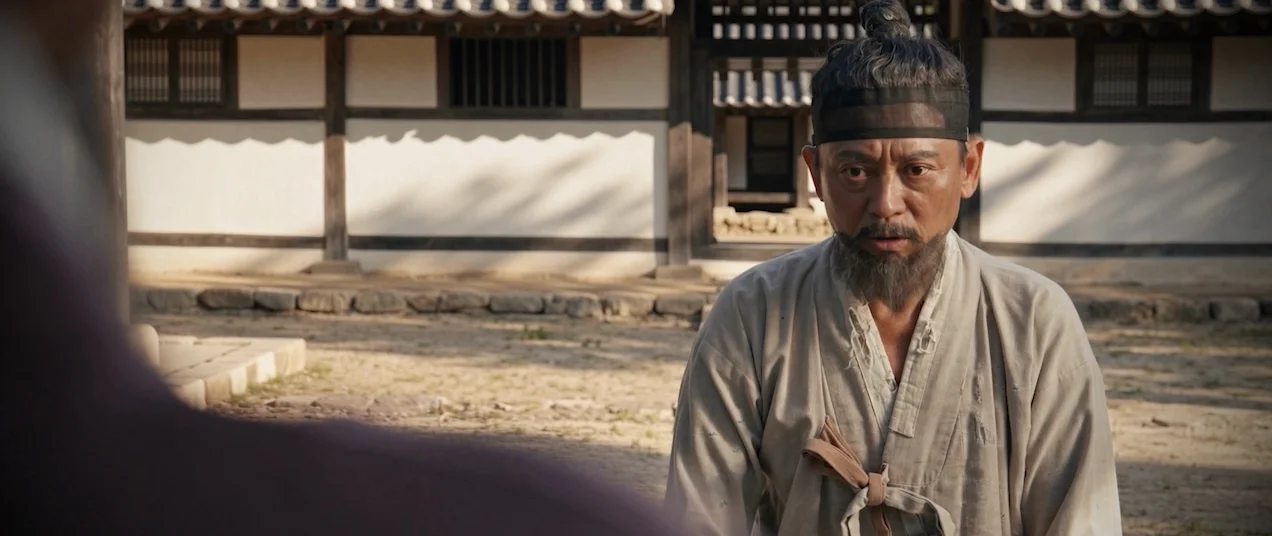 Final with SwitchX
Protecting the performances of veteran actors
Preserving the actors’ original performances was particularly important to you. Why was this difficult with the AI tools you initially tested?
Dongha: The film features several well-known veteran Korean actors with more than 30 years of experience, including Byeong-ok Kim from Oldboy, Eung-soo Kim from Tazza, and Sang-hee Lee from Hope. We wanted to preserve these accomplished actors’ performances exactly as they had delivered them, without altering them.
During casting, we realized that many actors, particularly established performers with a strong personal philosophy about their craft, are reluctant to appear in AI films. An increasing number of productions, including my previous film ZERO, use an actor’s likeness or image rights to place their face in an AI-generated film. But many actors view this approach negatively. They don’t want something that isn’t actually their performance appearing on screen in a way that differs from what they intended.
Most AI tools regenerate frames entirely from a reference video. As a result, emotions can easily become exaggerated, or the resulting performance can interpret the scene differently from the actor’s original intention.
The other major issue was camera movement. When we used AI tools to regenerate handheld footage shot by an experienced cinematographer, we found that the intended camera movement could subtly change. HELLBOUND relies particularly heavily on handheld cinematography. Handheld camera movement and shake are intentional. Conventional AI tools sometimes interpreted those intentional imperfections as mistakes and tried to correct them.
How did you discover Beeble and SwitchX?
Dongha: While I was struggling with these issues, SwitchX felt like the only real alternative. The technical director I work with sent me a YouTube video of SwitchX and said he had found a tool that might solve the problems I was facing. When I watched it, I literally cheered: “This is it!”
I became convinced that working with Beeble could help us overcome the technical limitations we had been encountering.
Keeping the actor, rebuilding everything else
Can you walk us through how a typical shot was completed, from the original footage through to the final image?
Sun Choi, AI Supervisor: From the beginning, our plan was to shoot all of the actors in a studio and create the backgrounds using AI. Because we needed to create entirely new environments while preserving the actors’ original positions and movements, we gave the performers as much physical space as possible on set. When necessary, we even filmed beyond the greenscreen area.
That created some unexpected challenges when we later began creating reference images from the footage. Because the camera captured objects outside the greenscreen area, items we never intended to appear in the final scene could also slip into the AI-generated imagery.
We therefore needed to clearly distinguish between elements we deliberately wanted to preserve and things that appeared only because they happened to be on set. We created masks, so we retained only the actors and the objects we intentionally placed in the original footage. For the remaining areas, we used SwitchX to composite new backgrounds based on the references we had prepared.
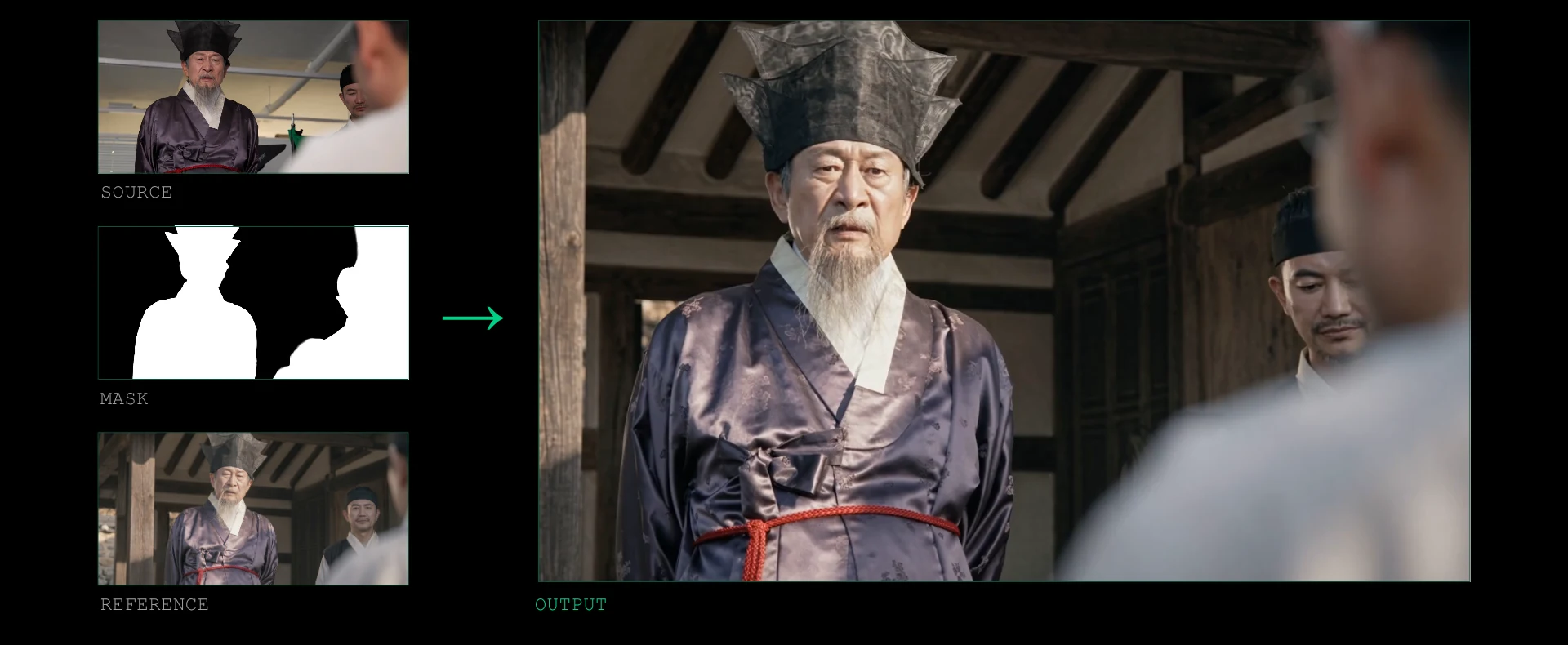
We preserved the people and objects that contained the director’s intent and reconstructed the surrounding space and lighting. We created our background references using image-generation tools including Seedream, GPT Image and Nano Banana, and for certain scenes also using photographs we had taken ourselves on location.
What mattered to us was not simply creating an attractive background. We needed to design the relationship between the light and the actor so that the performer felt as though they genuinely existed within that space. One of SwitchX’s major strengths for us was how it handled the relationship between the environment's light sources, how light falls on the subject, and the surrounding space.
So every time we created a scene reference, we asked questions such as:
- What is the primary light source in this environment?
- Which direction is the light coming from?
- How does it bounce around the space?
- Which parts of the actor should be illuminated, and which should remain in shadow?
For us, the reference image wasn’t simply a picture of what the background should look like. It also communicated the intended lighting direction for the scene. Using those references alongside the source footage and alpha video, we then performed the background replacement and relighting in SwitchX. The objective was to make the actor we had actually filmed feel naturally present within the newly constructed environment.
We still needed to finish the SwitchX output so that it worked as a complete cinematic image. Color grading was especially important to ensure the actor and background didn’t feel like separate elements.
That describes our process for shots centered on live-action performers. For certain fire sequences and wide establishing shots that were difficult to achieve practically, we also used a separate generative workflow with Seedance.
Drawing the line between footage and generation
How did you use masks and visual references in SwitchX to decide what stayed from the original photography and what could change?
Sun: Masks and visual references serve different purposes. The mask defines what should remain and what can change, while the reference provides the visual target for what the changed area should become. In actual filmmaking, however, understanding that principle is only part of the challenge. Deciding exactly how much of the original image to preserve is equally important.
Preserving an actor doesn’t necessarily mean that the actor’s entire body must remain identical in every situation. If a newly generated object needs to obscure part of an actor’s body, or if the actor is supposed to touch that object, there is a physical interaction between the captured material and the generated area.
If the preserved area is locked too broadly, the AI has less freedom to create that contact or occlusion naturally. So when necessary, we adjusted the preserved region to allow not only the interacting object but also parts of the body or other objects touching it to be regenerated.
The scene in which the actor touches an owl is a good example. The actor’s arm was present in the original footage, but instead of insisting the entire arm remain untouched, we adjusted the mask so SwitchX could redraw the part of the arm interacting with the owl. Instead of forcing the owl to fit unnaturally around the original arm's shape, we gave the system enough freedom to create the relationship between the arm and the owl together.
That doesn’t mean regenerating the actor’s entire performance. We protected the essential elements of the performance, particularly the face and expression, while regenerating only what was necessary to create a convincing interaction with a new object. It was about deciding, shot by shot, what absolutely needed to remain and where we could allow some freedom for change.
Ultimately, we found that a mask isn’t simply a tool for tracing an actor's outline. It is a way to define the boundary between the original photograph and the generated image. By defining that boundary appropriately and using the reference to establish the intended final appearance, we could preserve the core of the performance while still allowing the actor to interact naturally with newly created elements.
Photographing an open set instead of prompting for one
Historical accuracy was another challenge. How did photographing real locations become part of the workflow?
Sun: We didn’t want a vaguely “East Asian” environment. We wanted spaces that audiences could genuinely recognize as belonging to Korea’s Joseon dynasty.
However, when we asked the image-generation AI tools we were using to create Joseon-era architecture and environments, the results frequently leaned toward Chinese architectural styles. We realized that describing what we wanted in words alone wasn’t enough, so we eventually decided to visit an open set and photograph our own references.
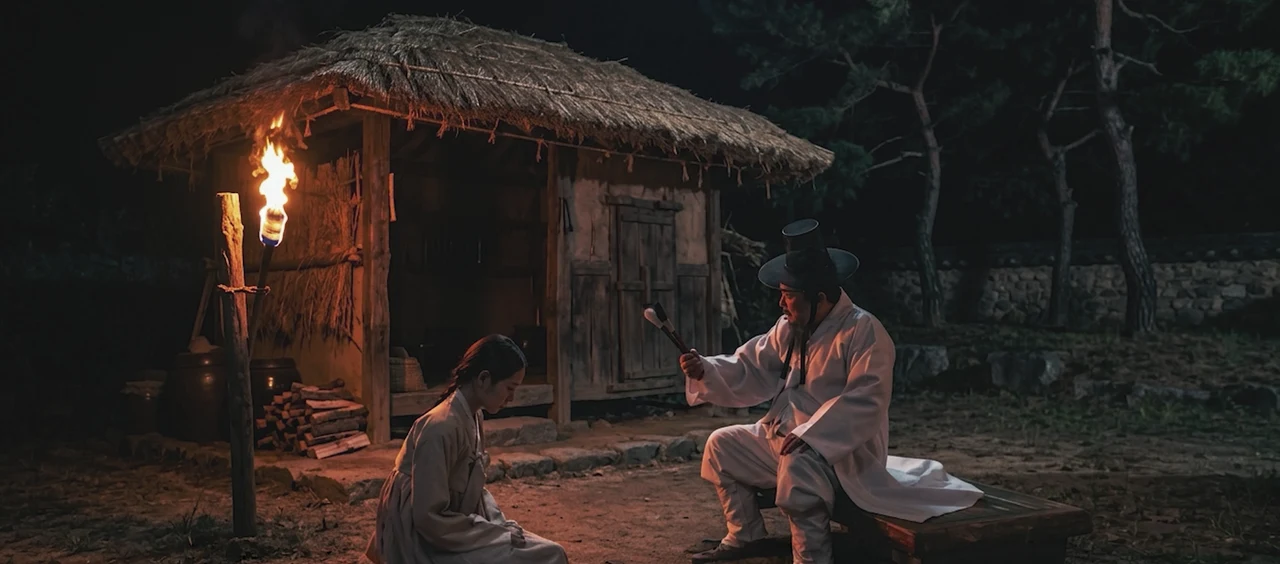 Generated background
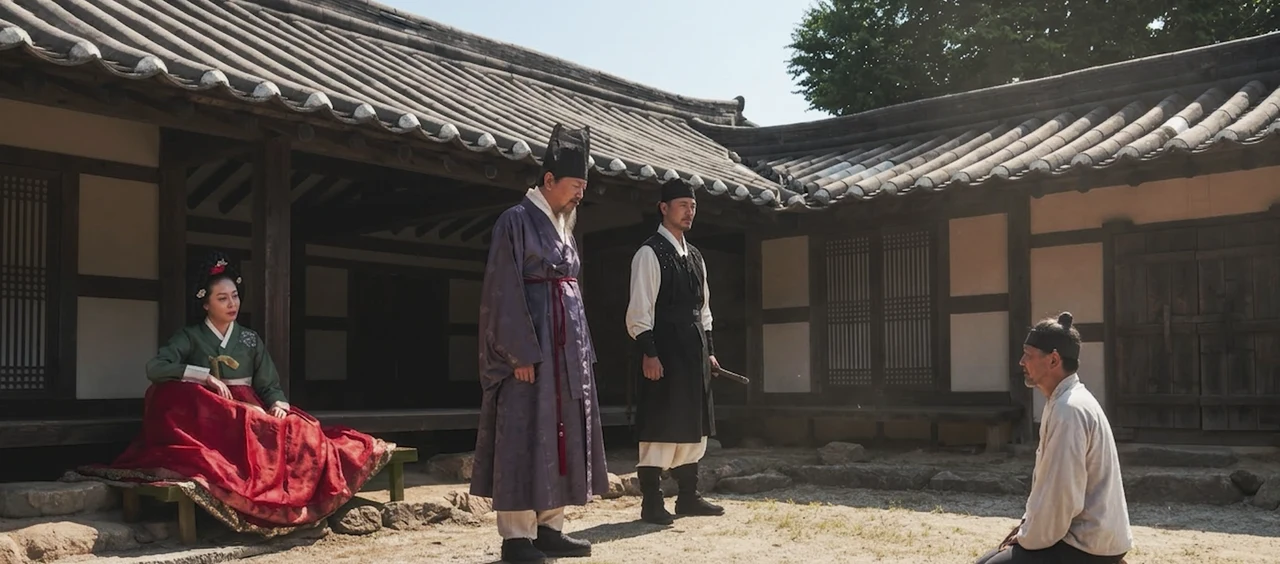 Location photo reference
At that point, we were still relatively inexperienced with this production method. We had already completed the studio shoot with the actors, then went out to find compositions that fit the footage we had captured.
Director Dongha Oh, producer Jongho Yoon, and I visited the open set together. We photographed backgrounds to match the actor's intended position in the existing footage, as well as the camera height and composition.
We went beyond documenting a location. We needed photographs that could connect with the actor we had already filmed and become part of the same shot. We then used those photographs as background assets, placed the characters within the frame, and used AI to bring the lighting of the characters and environment together to create the final reference assets.
A representative example of this approach appears in the full shots at the beginning of the film and the other shots in that sequence. We started with a specific real-world environment and then built the required character placement and lighting around it.
Through that process, we realized that real-world source material can become much more than a general mood reference. It can provide the AI with a concrete visual standard for the space it needs to create. We also learned that finding a historically appropriate environment and capturing it from a perspective that matches the original footage need to be considered together.
For us, photographing references on location became a way of achieving both historical credibility and a convincing visual connection to the original photography.
Capturing the actors, props and candlelight on set
How did the lighting, costumes, makeup, performances and production design captured on set influence the final images?
Sun: One thing we learned through this production was that the more you understand how on-set lighting, costumes, makeup, and performance will be preserved or transformed through the AI process, the more effectively you can shoot for post-production.
The fact that AI can change things later doesn’t make on-set decisions any less important. If anything, it makes it even more important to understand exactly what you need to capture practically.
Continuity was particularly important when a single scene was constructed from multiple shots. If the light source's position, the light's direction, the placement of recurring props, the room's structure, or patterns on the walls change from shot to shot, the audience may no longer perceive those images as belonging to the same space.
We found that even with the same prompt, different objects could appear or environmental details could change. That meant we couldn’t leave every element entirely to generation. So we filmed the actors practically, because they are where the audience’s attention is focused. We also used physical props, such as the brush the actor interacts with, on set.
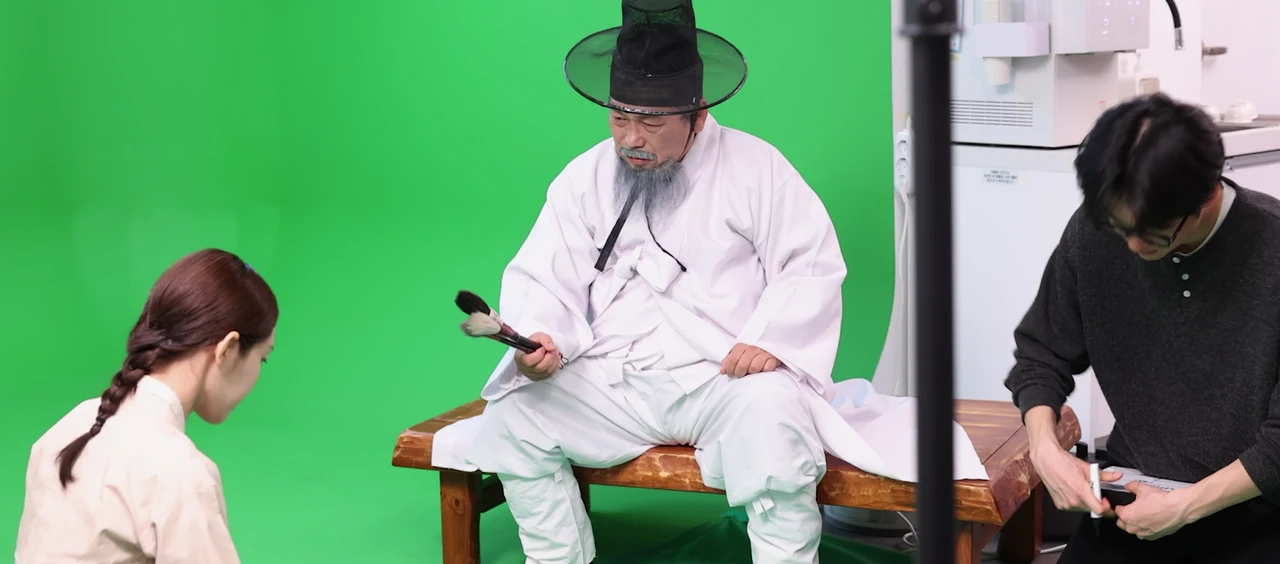
In addition to preserving the presence created by the actor’s performance, costume, and makeup, it was important to capture the physical interaction between the actor’s hands and those objects. Rather than asking the AI to reinterpret those elements every time, we made them concrete anchors that needed to remain consistent within the scene.
We also deliberately included the candles, our primary light sources, in the captured footage. Instead of simply describing the scene in a prompt as “lit by candlelight,” we wanted the footage to show where the light originated and how the flame moved. That gave the AI a reference for the illumination direction and the changing brightness, or flicker, produced by the flame's movement.
Ultimately, rather than asking AI to guess everything, we built the scene's reality around information we deliberately captured on set: the actors, props, and light sources.
Even if you intend to change the lighting or extend the environment in post, those changes still need to feel believable. For us, that meant planning from the shooting stage what information needed to be visible and what should remain as an anchor for the final image.
What SwitchX made possible, and where it stops
Looking back at the finished film, what did this workflow allow you to achieve that would have been difficult using either traditional VFX or other generative AI tools alone?
Sun: The biggest thing it enabled was the ability to keep the actor’s actual performance at the center of the film while substantially transforming the space and lighting around that performance. With the generative AI tools we initially tested, it was difficult to achieve both at the same time.
Even if the generated person resembled the actor, a change in gaze, facial expression, or timing made it a different performance. Our cinematographer's handheld camera movement was another expressive element we needed to preserve.
With workflows that generate a new video from a reference, the original footage doesn’t simply carry through unchanged. The AI interprets it, and the result can shift. You also can't describe an actor’s subtle emotion or timing accurately enough through words and images.
SwitchX mattered to us because it let us distinguish what needed to stay and what we could create anew, using the performance we had already filmed as the foundation. We could regenerate specific areas that required interaction without handing the entire performance back to the AI to reinterpret.
That doesn’t mean SwitchX should be used for everything, or that other generative AI tools aren’t necessary. We used separate generative AI tools ourselves for certain fire sequences and establishing shots. A shot that requires protecting a live actor’s performance has different requirements than a shot where you want to create an entirely new image from scratch. I don’t think these tools need to replace one another completely. Filmmakers should be able to choose and combine them based on what each shot requires.
Compared with traditional VFX, another major advantage was achieving certain shots through a more streamlined process that would otherwise have required several specialized stages. For a project like HELLBOUND, where backgrounds and lighting need to change across many shots, a traditional workflow might require, depending on the shot, background asset creation and compositing, potentially building 3D environments, camera tracking, and lighting and color adjustments. All of those processes require skilled artists, time, and budget, which can become a significant burden for a smaller production team.
With the SwitchX workflow we used, we could replace the background and relight using an appropriate reference image, along with the source footage and alpha video. It was particularly useful to generate results where the background and lighting responded to handheld, moving footage.
We still needed to prepare the references, review the results, and carry out color grading, of course. But it reduced the burden of building every environment element as an individual asset and then separately matching its movement and lighting.
There were, however, clear limitations when it came to precise control. The workflow we used doesn’t operate like a traditional 3D pipeline, where you can isolate individual objects and adjust their position, shape, or movement to exact values. For shots where a specific object's movement or form needs extremely fine control, I believe traditional VFX still plays an important role. But not every shot requires that degree of individual control.
In shots where the goal is to retain a real actor’s performance while naturally extending or transforming the environment and lighting around them, SwitchX gave us a wider range of practical production options. We kept the actors' on-set performances at the center of the film, then chose the most appropriate tool for each shot to build the world around them.
For production teams like ours that are beginning to adopt this approach, these tools can expand what we can express. And for established VFX artists, they can sit alongside existing techniques as another way to solve certain tasks more efficiently.