How Second Image used Beeble to build four game worlds for Google Play
"For me, I see AI becoming almost like a new department within the pipeline rather than simply replacing the existing ones."
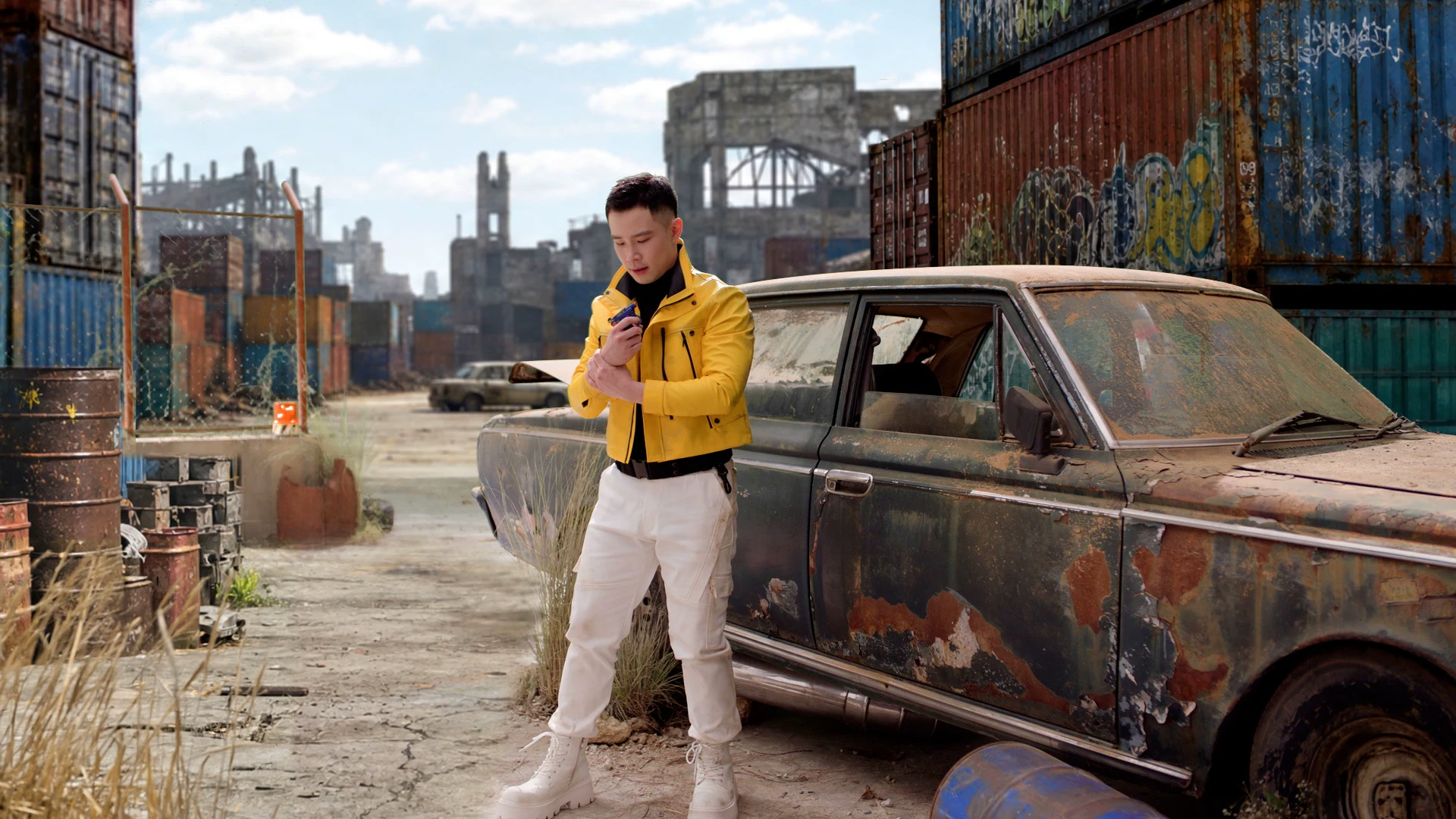
When Bangkok-based Second Image Studio took on a Google Play Indonesia commercial, the brief called for its protagonist to move through four distinct game-inspired worlds, each with its own environments, lighting, costumes, and visual language.
The creative ambition was substantial. The schedule was even more challenging. Second Image had around two weeks of pre-production and three weeks of post-production, with more than 40 shots moving through review cycles lasting five to seven days.
Building every environment using a conventional CG pipeline would have required considerably more artists, rendering time, and effort, and would have made major creative changes increasingly difficult as the deadline approached.
Instead, VFX Supervisor Ronnachai Changsri (Nat) developed a hybrid workflow that combines practical set pieces, AI tools, Beeble, and traditional VFX. Working closely with director Chaw Khana, the Second Image team developed and refined the visual design of the environments throughout the project.
The approach allowed Second Image to iterate on environments quickly while keeping artists in control of the look, compositing, and final finish.
We spoke with Nat about designing the workflow, what he learned from using Beeble on a production for the first time, and why he sees AI becoming another part of the VFX pipeline rather than a replacement for it.
Nat, can you tell us a little about yourself and Second Image Studio?
I’m a CG Supervisor, and I run Second Image Studio in Bangkok. I started the company around four years ago. Before that, I worked at studios in South Korea, Malaysia, Singapore, and Thailand, eventually returning to Bangkok to start my own project.
We’re actually a very small team. There are only two permanent employees, and then we build out the rest of the team with freelancers and contract artists depending on the project.
What was the brief for the Google Play Indonesia commercial?
Google Play was launching a campaign to promote its Play Points rewards, offering users additional points when they top up or make purchases on the platform.
The promo involved several gaming partners, including MLBB, Free Fire, and Roblox, and the director wanted to bring those different game worlds into the film. To achieve that, we divided the commercial into four distinct worlds. The main character remains the same, but his outfit, environment, lighting, and what happens around him change from world to world.
One of our biggest challenges was the schedule. We had around two weeks for pre-production and approximately three weeks for post. We knew from the beginning that the environments would continue developing through close collaboration between the director, client, agency, and our VFX team, so we needed a workflow flexible enough to support that process.
If we had built all those environments using a traditional CG workflow, it would have required many more artists and much more time. More importantly, whenever something changed, we might have had to go back and rebuild or rework a large part of it.
That was where Beeble came in.
How did you approach the shoot knowing you would be using this workflow?
The director wanted to shoot everything on green screen, but we also used practical props and set pieces.
I had actually spoken with someone from Beeble on Discord beforehand about working with camera movement. They suggested including practical objects in the scene to provide information about the space and camera movement.
So I encouraged the production to include as many useful, practical elements on set as possible, including stones, ruins, glass, leaves, vehicles, and other objects that belonged in the scenes. Then we could build out the rest afterward.
That turned out to be really important.
Was this your first time using Beeble on a production?
Yes. I had heard about Beeble before and had tested it because I thought the results looked amazing, but those were really just experiments.
This was the first time I used it on a real production.
What did the workflow look like once the footage came into post?
It wasn't a case of shooting an actor on green screen, putting the footage into Beeble and delivering the result. There were artists involved both before and after Beeble.
We would start by developing the environment and creating a rough slap comp using the original footage and the background. At that point, you might still have the green screen, hard edges, and other things that obviously weren't integrated.
We used other AI image tools to help develop a single reference frame, blending edges and working out things like lighting and contact shadows. Once we had a reference we were happy with, we could import it into Beeble and use it to handle the footage, including camera movement and environment replacement.
After that, we would return to the traditional VFX process and add everything needed to complete the shot: smoke, leaves, crystals, lens flares, atmosphere, and other CG or compositing elements.
So Beeble became one part of a much larger pipeline.
How important was iteration on this project?
It was probably one of the biggest advantages. We had more than 40 shots, and in some review cycles we only had five to seven days. There were also significant creative changes.
For one environment, for example, we already had a background that was working well when the director decided he wanted to introduce additional ruined structures. We didn't want to regenerate everything from scratch because we needed to preserve what was already working.
We could retouch the reference, create a new slap comp with the additional structures, and then use Beeble to bring that revised environment back into the moving shot.
That flexibility meant we could leave some of the technical problems behind and spend more of our available time making creative decisions. When you get results faster, you have more time to ask, “How can we make this better?”
That was something new for us. We had never worked this fast before.
Did anything particularly surprise you about what Beeble could handle?
The gun transformation really surprised me. Normally, we used Beeble mainly for backgrounds and relatively static elements, and then we would composite moving elements. In this sequence, however, the character's gun needed to transform from a small gun into a much larger weapon.
Originally, I planned to do that using traditional CG. We had already created the model and textures. But I decided to test whether we could achieve it with the AI workflow instead. The result from Beeble really surprised me. There were other things in the shot that still needed work, but the gun itself worked incredibly well. I didn't expect that.
How did you maintain consistency when the same world appeared from different camera angles?
That was another important part of the workflow. We might see the same world from the left, then from the right, and then from another angle. Each shot needed to look believable, but the audience also had to immediately understand that all the shots were taking place in the same world. It's not enough for every shot to look good on its own. They have to belong together.
The speed of iteration helped us develop that consistency across the sequence rather than simply generating a completely different environment every time.
Which sequence was the most challenging?
The final castle sequence was probably the toughest. The director was closely involved in developing the environment with us, and we went through several major iterations of the castle design before arriving at the final look. If we had been working entirely in traditional CG, those kinds of changes could have meant going back into modeling and repeatedly reworking the geometry.
Using this workflow allowed us to make those creative decisions much faster. Beeble gave us a strong starting point for the environment, but because this was the final sequence of the film, where everyone comes together for a celebration, the director wanted it to feel much bigger and more alive.
We therefore added extensive CG and compositing on top of the Beeble result to create the festival atmosphere and complete the sequence.
What difference did the workflow make to the overall production?
For the full film, it's difficult to make an exact comparison, but a conventional approach would likely have required a significantly longer schedule and a larger team, given the number of environments, revisions, and level of detail involved. There are cost benefits, too, particularly when you consider the number of artists and the render time required to build all these environments traditionally.
But I think it's important to be clear that this doesn't remove the artist. We still needed artists to create the slap comps and develop the references before Beeble, and later on we still needed artists for smoke, lens flares, atmosphere, CG elements, and all the other details that make the final image work.
What did the project teach you about shooting for an AI-assisted VFX workflow?
Practical elements matter a lot, particularly when the camera is moving. We had real objects on set, including things like the car in one of the sequences, and they gave the shot structure. That helped enormously when we built the environment around the footage.
Since then, I've had clients ask whether we can simply shoot an actor alone against a green screen and create everything else afterward with AI. For a static camera, you might be able to do that. But with a moving camera, I wouldn't approach it that way. Based on what we learned from this project, I would definitely plan practical props and set elements into the shoot again.
Having used AI throughout this production, do you think it changes the role of the VFX artist?
Clients ask me this a lot: Is AI going to replace CG artists?
After using so many AI tools on this project, I feel they cannot think for us. We need to think for them and then let them do their work. There are still creative decisions being made by artists before and after the AI. For me, I see AI becoming almost like a new department within the pipeline rather than simply replacing the existing ones.
There are certainly tasks it can reduce. On this project, for example, we didn't do traditional rotoscoping. We only needed some simple masking around the face. That alone saves a lot of time. But the creative decisions still come from the artists.
Ready to explore Beeble?
Project credits
- Client: Google Play
- Production House: Player 2 Bangkok
- Film Director: Chaw Khana
- Executive Producer: Woei Woei
- Film Producer: Melvin Wong, Ing Mahayotsanun
- Assistant Director: Boum Wongwatpong
- Post Producer: Panitta Trang
- VFX: Second Image Studio
- VFX Supervisor: Ronnachai Changsri (Nat)
- VFX Producer: Kanyanat Chomchoei
- CG Supervisor: Nattapong Surakittidate
- Assets Artist: Worachot Ruangsri
- Rigging: Sorawit Limkertpol
- Animator: Chayanee Denmuanvong, Aniwut Yodkaew
- Lighting Artist: First Nattapong, Teerasan Suppasri
- Compositor: Tanaklit Ketkaew, Phanin Paichoe, Ronnachai Changsri